Skip to content
Twinnoverse
  • About Us
  • Careeres
  • Legal
  • Contact Us
  • English
    • English
    • Français
    • العربية
Twinnoverse
Search
  • About
  • Contact
  • digital twin Blog page
  • Documentation
  • Home – twinnoverse – digital twin

Getting Started

  • Protected: Welcome to Twinnoverse!
  • Quick Start: Your First 3D Real-Time Scene in 5 Minutes

Asset Management

  • Protected: generate a 3D asset from image
  • Uploading and Preparing 3D Models
  • Using the Asset Editor
  • Supported 3D Formats & Best Practices

Datasource Management

  • Datasource Types Explained
  • Setting Up an API Ingest Datasource
  • Understanding API Keys & Security

Widget System

  • Creating Alerts
  • Adding Widgets to a 3D Asset
  • Widget Library Reference
    • LineChart Widget
    • BarChart Widget
    • DoubleData Widget
    • Single Data Widget

The Scene Engine

  • How to navigate the 3D scene
  • Scene Editor vs. Scene Viewer
  • Building a Scene in the Editor

Developer & API

  • Ingest API Reference

Usecase & Examples

  • Data Connectors
    • from Excel TO 3D visualization
  • Usecases
    • pharmacetical manifactre shop floor
View Categories
  • Home
  • Docs
  • Datasource Management
  • Datasource Types Explained

Datasource Types Explained

2 min read

In Twinnoverse, a datasource is any source of external information that you want to visualize in your 3D scenes. To accommodate different kinds of data streams, the platform supports different methods of data retrieval, primarily categorized as (Only Push for now).

Understanding the difference is key to choosing the right setup for your needs.

Table Of Contents
  • Push Datasources

Push Datasources #

A Push datasource, also known as an endpoint-based datasource, is a passive listener. It provides a unique, secure URL (the Ingestion URL) and waits for an external system to send data to it.

This is the primary method used in the current version of Twinnoverse.
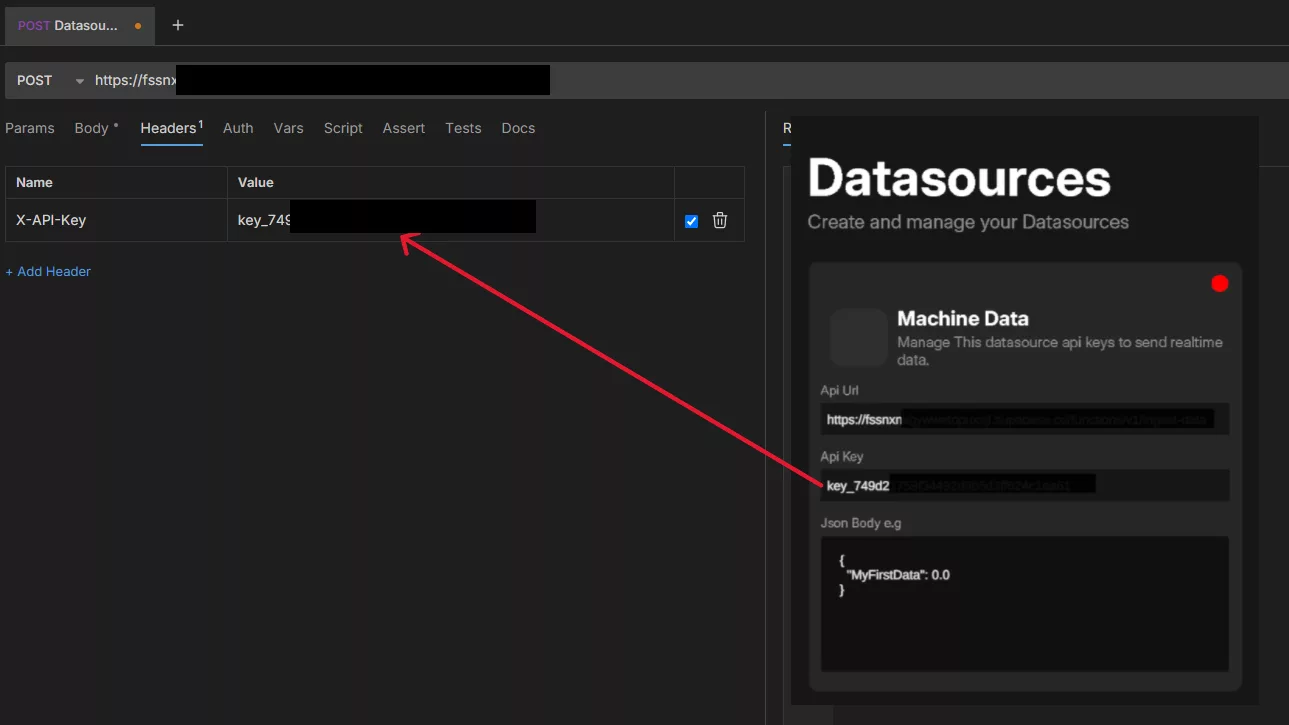
Add the X api key in the name, and the api key in the value

How It Works:

  1. You create an “API Ingest” datasource in Twinnoverse.
  2. The system generates a unique Ingestion URL and a secret API Key.
  3. You configure your external application, script, or IoT device to send an HTTP POST request to this URL whenever there is new data.
  4. The request must include the API Key for authentication.
  5. Twinnoverse receives the data, validates it, and updates any linked widgets in real-time.

Characteristics:

  • Real-Time: Data appears almost instantly because it is sent the moment it’s generated.
  • Offline: Since you push the data to the Datasource you can work with your local data.
  • Efficient: Twinnoverse is not constantly asking for updates. It only acts when data arrives.
  • You Are in Control: Your external system controls the rate and logic of when data is sent.

Best For:

  • IoT sensors that send readings on a schedule or when a value changes.
  • Event-driven systems (e.g., sending an update when an order is placed).
  • Integrating with low-code platforms like n8n or Make.com that can easily make HTTP requests.
  • Any scenario where you can write a script to post data.
Updated on January 19, 2026

What are your Feelings

  • Happy
  • Normal
  • Sad

Share This Article :

  • Facebook
  • X
  • LinkedIn
  • Pinterest
Understanding API Keys & SecuritySetting Up an API Ingest Datasource

Powered by BetterDocs

Leave a Reply Cancel reply

Your email address will not be published. Required fields are marked *

Table of Contents
  • Push Datasources

Menu

  • Documentation
Email

Copyright © 2026 Twinnoverse